Insights
Cards under the Home minis that point at the next action — start the plan, a payday, a blown budget, a weekly rundown.
What appears is not a fixed carousel. Alert-driven cards and rundowns are gated in Plan Settings. Onboarding cards bootstrap once. Dismiss is on Home, not a preference. See Home for where the stack sits, and Transactions for destinations a card may open.
On Home
At most two real cards are visible, plus a terminal “You’re all caught up” card. Swipe dismisses the top card. The corner × morphs to Clear and dismisses the stack. When the API list is empty, the whole section unmounts — Home is just the gauge and the two activity cards.
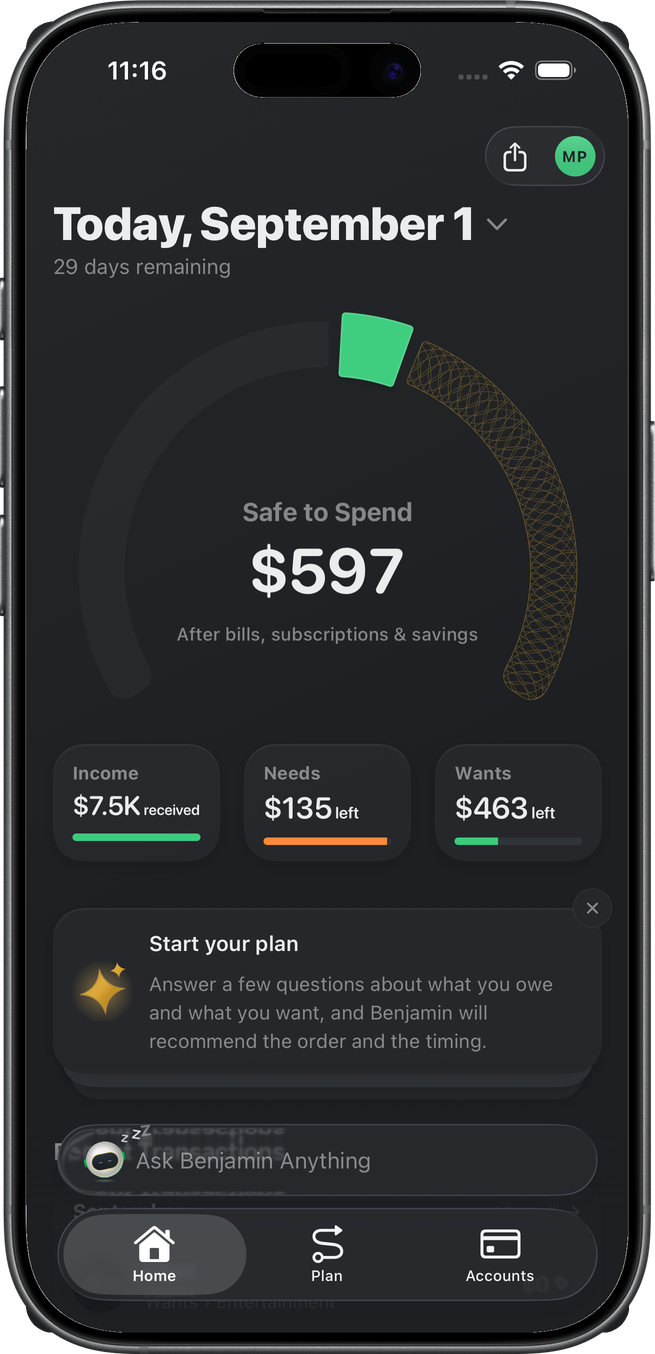
A tap follows the card’s primary action (plan setup, invite, a transaction, a review). There is no separate Insights tab.
Plan Settings — Rules
Avatar menu → Plan Settings → Rules. Each row shows a quiet On / Off status. Tapping it opens a channel sheet of In-app, Push, and — once Email Alerts is on — Email. See Plan Settings for the sheet and group rows.
- In-app OFF — the alert stops entirely: no Home card, no push, no email.
- Push OFF — the card still lands on Home; only the notification is suppressed.
- Email ON — that alert also arrives by email; several in one sync bundle into a single email.
- Budget blown has no toggle. It always fires at ≥100% of a budget.
Sections: Income (Payday), Transactions, Refunds, merchant watches, budget thresholds, Low balance, Credit utilization, Price increases. Upcoming subscription reminders are no longer a standalone alert — the Weekly Rundown's "Coming up this week" slide carries them (see The Rundown).
Digests
On the same Rules tab, Weekly Rundown and Monthly Rundown appear when reviews are available for the space. Their sheet has only In-app — OFF skips generation: no story, no card, no push. Rundown push follows the master switch. The story itself is The Rundown.
Notifications
Notifications holds the master Push Notifications switch and the Email Alerts switch (off by default — no alert email is ever sent until you opt in). Turning either off cascades that channel off on every rule (persisted). Insights history under the switches is the archive of delivered cards — tap a row to re-follow its action. History is not a preference; it does not hide future cards.
What settings do not control
Onboarding cards — Start your plan, the trim intro, Add your partner — bootstrap once per space. They are not in the Rules grid. Completing the action retires the card (finalize Build Your Plan, build a trim, send an invite).
Dismiss on Home is per person. It is not stored as a Plan Setting.
Related
- Home — stack under the minis
- The Rundown — the weekly / monthly story a digest card opens
- Transactions — detail routes some alerts open
- Sign-up — first onboarding cards after subscribe
- Plan — the wizard the Start your plan card opens