SMS Consent & Opt-In
Program Name: Wellthplan Brand: Wellthplan, LLC Effective Date: August 3, 2026
This page is the public record of the Wellthplan SMS program. It documents how end users consent to receive text messages from Wellthplan, LLC ("Wellthplan," "we," "us," or "our"), the types of messages we send, how often we send them, and how any recipient can opt out at any time. It is published for our users as well as for carriers, messaging aggregators, and compliance reviewers who need to verify our opt-in practices.
Program Description
Wellthplan is a personal finance application that helps individuals, households, and the financial professionals who serve them understand and manage money. We send text messages from our registered business number, through a carrier-registered A2P 10DLC campaign, for exactly one purpose:
- Phone verification codes — one-time passcodes sent when a user signs in with their phone number or verifies a phone number on their account
Every message is a direct reply to an action the recipient has just taken in the Wellthplan app or website. We do not send promotional or marketing text messages, we do not send account notifications or reminders by text, we do not send texts to people who have not personally provided their number to us, and we never send messages unrelated to the Wellthplan service.
How Users Opt In
Both opt-in points are inside the Wellthplan app (iOS and Android) and the web app at app.wellthplan.com, where a user must be creating or signing in to their own account. On every one of these screens, consent is collected with an explicit checkbox that is unchecked by default: the user must enter their own mobile number and tick the box before the button that sends the code becomes available. Nothing is pre-checked, the box is never ticked on the user's behalf, and exactly one message is sent per request.
The web sign-in opt-in page is publicly reachable without an account:
https://app.wellthplan.com/sign-up?screen=signin&method=phone
The registration opt-in (Method 2) appears after an account is created, so the screenshots below are the public record of exactly what a user sees there, and are kept current with the shipped product.
Method 1: Phone number sign-in (verification codes)
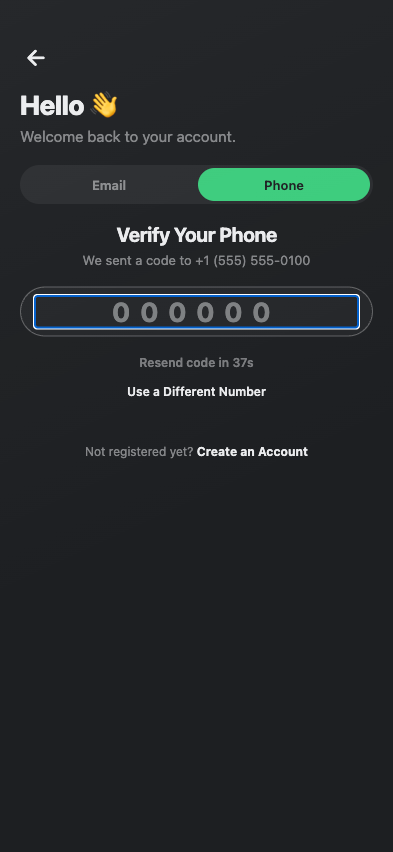
During sign-in, users voluntarily enter their own mobile phone number, tick the consent checkbox, and tap Send Code to request a one-time verification code. The Send Code button is disabled until the box is checked. The checkbox label displayed directly beneath the phone number field reads: "I agree to receive a one-time sign-in code from Wellthplan by text at the number above (one message per request)." Beneath it: "Msg & data rates may apply. Reply STOP to opt out, HELP for help." followed by links to our Privacy Policy and Terms of Service.
What the user sees before consenting (mobile app):
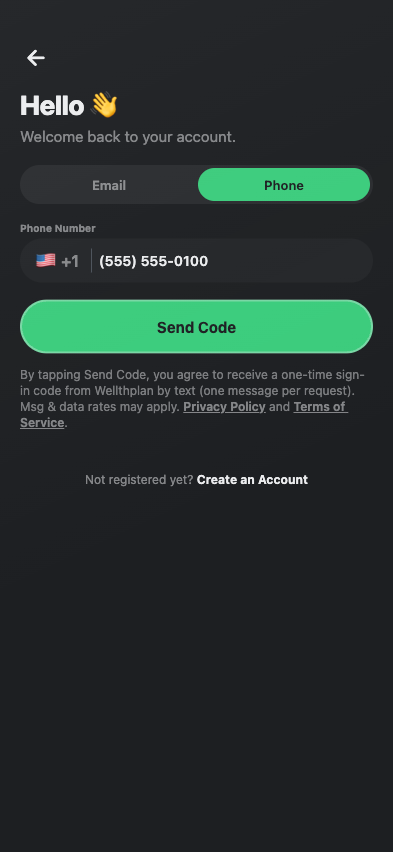
What happens after tapping Send Code: a single verification code is sent to the number the user entered, and the app shows the code-entry screen. No other message is sent.
The same checkbox appears on the web at app.wellthplan.com/sign-up?screen=signin&method=phone:

Method 2: Verifying a phone number during account registration
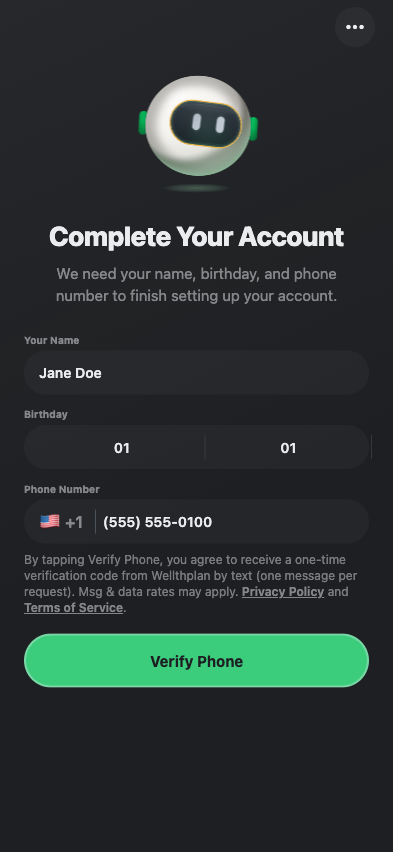
Users add a mobile phone number on the "Complete Your Account" step of registration (mobile app and web). The same unchecked consent checkbox sits directly beneath the phone number field; its label reads: "I agree to receive a one-time verification code from Wellthplan by text at the number above (one message per request)." followed by "Msg & data rates may apply. Reply STOP to opt out, HELP for help." and links to our Privacy Policy and Terms of Service. The Verify Phone button is disabled until the box is checked. Tapping it sends a single verification code to the number entered and shows the same code-entry screen as Method 1. No other message is sent, and no other text-message consent is requested on this screen.
Mobile app:
Web (app.wellthplan.com):

Financial professionals who register as Wellthplan agents (directly or by accepting an invitation) verify their phone number through the same step. Their registration confirmation and referral-code recovery are delivered by email, not by text.
Sample Messages
Verification code (the only message type we send):
Your Wellthplan verification code is 123456. Reply STOP to opt out, HELP for help.
Opt-out confirmation (sent once, in reply to STOP):
You have successfully been unsubscribed from Wellthplan. You will not receive any more messages from this number. Reply START to resubscribe.
Help reply (sent in reply to HELP):
Wellthplan: Reply STOP to cancel. Msg&Data Rates May Apply. Support: support@wellthplan.com
Required Disclosures
- Message frequency varies based on account activity. Verification codes are sent only when the user requests one — one message per sign-in or phone verification, typically fewer than 5 messages per month.
- Message and data rates may apply.
- Opt out at any time by replying STOP to any message. You will receive one final confirmation message and no further texts.
- Reply HELP for help, or contact us at support@wellthplan.com.
- Consent is not a condition of purchase. Text messaging is used only to deliver the verification code a user has just requested; we do not use the number for any other messaging. Users who prefer not to receive texts can sign in with email and password instead.
Privacy of Mobile Information
No mobile information will be shared with third parties or affiliates for marketing or promotional purposes. Text messaging originator opt-in data and consent will not be shared with or sold to any third parties or lead generators. We share mobile phone numbers only with our SMS delivery provider, solely to deliver the messages described on this page.
For complete details on how we collect, use, and protect your information, see our Privacy Policy and Terms of Service.
Opting Out
You can stop receiving text messages from Wellthplan at any time by:
- Replying STOP (or STOPALL, UNSUBSCRIBE, CANCEL, END, or QUIT) to any message from our number
- Removing your phone number from your account in the Wellthplan app
- Emailing support@wellthplan.com with your opt-out request
Opting out of text messages does not affect your Wellthplan account. You will continue to receive essential account communications by email. Because verification codes are also delivered by text, a user who has opted out and later wants to sign in with their phone number can reply START to resubscribe or sign in with email instead.
Contact
Wellthplan, LLC 616 S 300 E, St George, Utah 84770
- Support: support@wellthplan.com
- Privacy: privacy@wellthplan.com
Last Updated: October 7, 2026